
How to Rank a New Website on Google: A Complete Beginner’s Guide (2026)
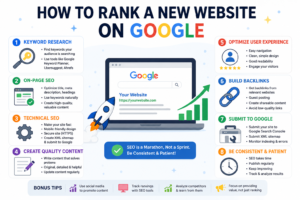
Launching a new website is exciting, but getting it to appear on Google can feel overwhelming. Many website owners expect instant rankings, only to realize that SEO takes time, strategy, and consistency.
The good news is that Google wants to show users the most helpful and trustworthy content. If you focus on creating value and follow SEO best practices, your website has a strong chance of earning organic traffic over time.
In this guide, we learn the exact steps to help a new website rank higher on Google, even if starting from scratch.
Why Does not a New Website Rank Immediately?
Google doesn’t automatically trust a brand-new website. Before ranking pages, Google’s search engine evaluates several factors, including:
- Content quality
- Website structure
- User experience
- Backlinks
- Website authority
- Search intent
New websites often go through what is commonly known as the “Google Sandbox,” where rankings may take several weeks or months to stabilize. Although Google has never officially confirmed this term, many SEO professionals observe this pattern with new sites.
Choose the Right Keywords
Keyword research is the foundation of SEO.
Instead of targeting highly competitive keywords like:
- Digital Marketing
- SEO
- Online Marketing
Target long-tail keywords with lower competition, such as:
- How to rank a new website on Google
- SEO tips for beginners
- Best free SEO tools for small businesses
- Local SEO guide for startups
Helpful keyword research tools include:
- Google Keyword Planner
- Google Search Console
- Google Autocomplete
- Google Trends
- Ahrefs
- SEMrush
- Ubersuggest
Publish High-Quality Content
Google rewards content that genuinely helps users.
Every blog post should:
- Answer the user’s question completely.
- Be easy to read.
- Include practical examples.
- Use simple language.
- Stay up to date.
- Provide unique insights instead of copying other websites.
Optimize Your On-Page SEO
On-page SEO helps search engines understand your content.
For every article, optimize:
Title Tag
Include your primary keyword naturally.
Meta Description
Write a compelling description of around 150–160 characters.
URL
Keep URLs short and descriptive.
Headings
Use one H1 heading and organize your content with H2 and H3 headings.
Images
Optimize every image by:
- Compressing file size
- Using descriptive filenames
- Adding relevant alt text
Improve Website Speed
A slow website can hurt both user experience and search rankings.
To improve speed:
- Compress images.
- Enable browser caching.
- Minify CSS and JavaScript.
- Use a Content Delivery Network (CDN).
- Choose reliable web hosting.
Make the Website Mobile-Friendly
More than half of all web traffic comes from mobile devices.
- Load quickly on smartphones.
- Display correctly on all screen sizes.
- Have readable text without zooming.
- Include easy-to-tap buttons.
Submit the Website to Google
Once website is live, help Google discover it by submitting your sitemap.
- Create an XML sitemap.
- Verify website in Google Search Console.
- Submit the sitemap.
- Monitor indexing and performance.
Build Internal Links
Internal linking improves navigation and helps search engines understand the website structure.
Benefits include:
- Better user experience
- Improved crawlability
- Increased page authority
- Longer visitor sessions
Earn Quality Backlinks
Backlinks remain one of Google’s strongest ranking signals.
Focus on earning links from reputable websites by:
- Publishing valuable content
- Writing guest posts
- Creating helpful guides
- Sharing original research
- Building relationships within your industry
Avoid buying backlinks or participating in spammy link schemes, as these practices can lead to penalties.
Focus on User Experience
Improve the site by:
- Using a clean design
- Making navigation simple
- Reducing intrusive pop-ups
- Improving readability
- Adding clear calls to action
When visitors enjoy using your website, they’re more likely to stay, engage, and return Keep Publishing Consistently
SEO is a long-term strategy.
A realistic publishing schedule could be:
- 1–2 high-quality articles each week
- Update older content regularly
- Add new information as trends evolve
Common SEO Mistakes to Avoid
Many beginners slow their progress by making avoidable mistakes, such as:
- Keyword stuffing
- Publishing thin or duplicate content
- Ignoring technical SEO
- Neglecting mobile optimization
- Using misleading titles
- Forgetting internal links
- Not monitoring website performance
How Long Does It Take to Rank a New Website?
There is no guaranteed timeline, as rankings depend on your niche, competition, and SEO efforts.:
- Indexing can happen within a few days to a few weeks.
- Initial keyword rankings may appear within one to three months.
- More competitive keywords often take six to twelve months or longer.
Patience and consistency are important.
Final Thoughts
Ranking a new website on Google does not happen overnight, but it is achievable with the right strategy.
Focus on understanding your audience, publishing high-quality content, optimizing your pages, improving user experience, and earning trustworthy backlinks.
Over time, these efforts can help your website gain visibility, attract organic traffic, and build long-term authority.
The most successful websites are not built in a day. They are built through steady effort, continuous learning, and a commitment to helping users find the answers they are looking for.