
Best Laptops for Students in 2026:
Best laptops for students is one of the most important decisions for any student. Whether attending online classes, writing assignments, coding, designing graphics, or editing videos, a reliable laptop can make studying easier and more productive.
With so many options available, finding the perfect laptop can be confusing. This guide highlights the best laptops for students in 2026 based on performance, battery life, portability, display quality, and value for money.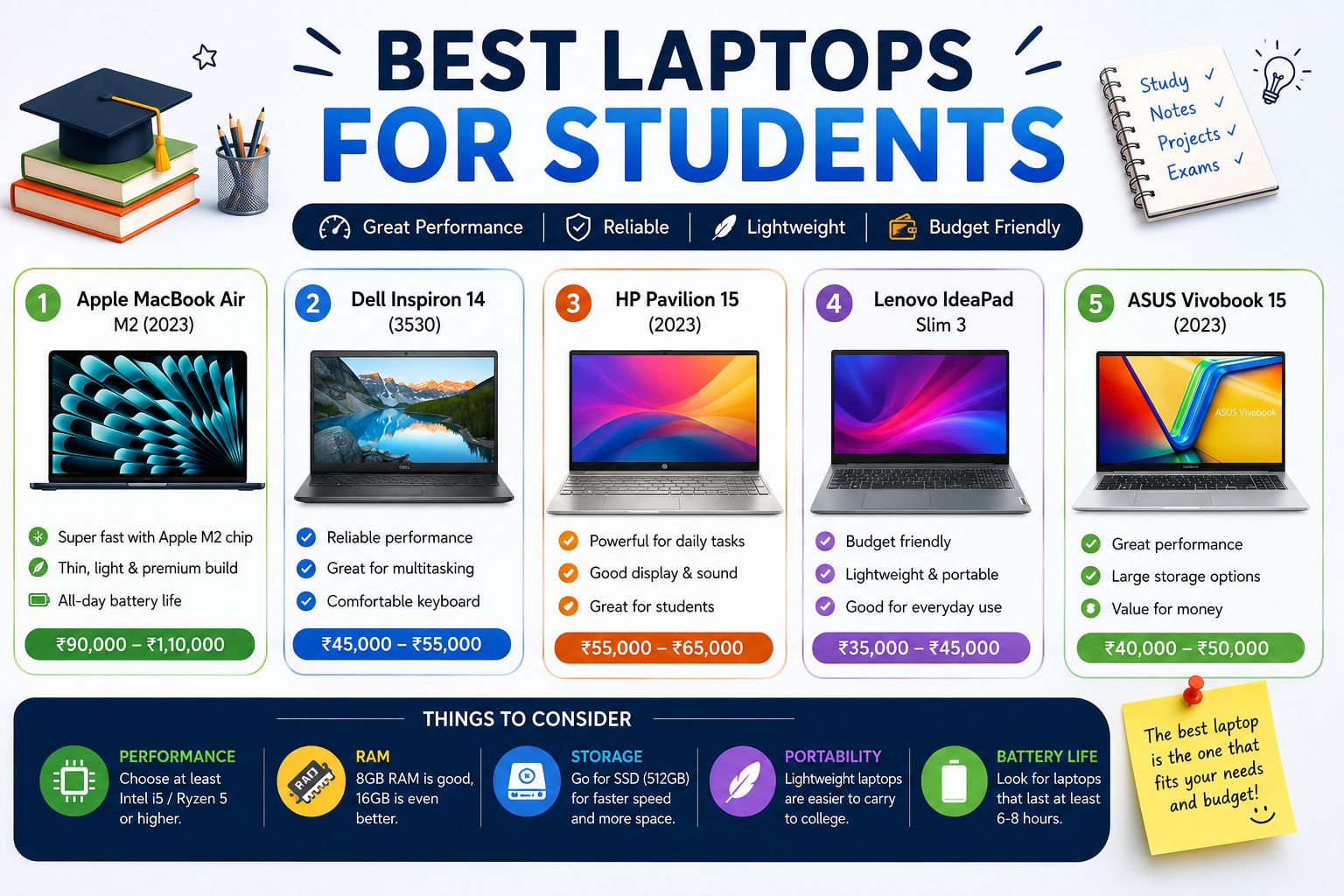
What Should Students Look for in a Laptop:
- Processor: Intel Core i5/i7, AMD Ryzen 5/7, or Apple M-series chips.
- RAM: At least 8GB (16GB is recommended for programming, editing, or multitasking).
- Storage: 256GB SSD minimum; 512GB SSD is ideal.
- Battery Life: Aim for 8–12 hours or more.
- Display: Full HD (1920×1080) or better for comfortable viewing.
- Weight: A lightweight laptop is easier to carry to classes or libraries.
1. Apple MacBook Air (M4)
Pros
- Powerful Apple M4 chip
- Outstanding battery life
- Lightweight and premium design
- Silent fanless operation
- Excellent Retina display
Cons
- Higher price than many Windows laptops
- Limited gaming support
If your budget allows, the MacBook Air with the M4 chip is one of the best all-around laptops for students. It offers exceptional speed, long battery life, and excellent build quality.
2. ASUS Vivobook 15
Best for: Everyday students on a budget
Pros
- Affordable price
- Good Full HD display
- Comfortable keyboard
- Fast SSD storage
Cons
- Average speakers
- Battery life could be better
The ASUS Vivobook 15 provides excellent value for students who need a dependable laptop for studying, presentations, web browsing, and streaming.
3. Acer Aspire 5
Best for: School and college students
Pros
- Strong performance
- Good keyboard
- Expandable RAM
- Budget-friendly
Cons
- Basic design
- Average webcam
The Acer Aspire 5 has remained one of the most popular student laptops because it delivers reliable performance at an affordable price.
4. Lenovo IdeaPad Slim 5
Best for: Multitasking and office work
Pros
- Premium build quality
- Bright display
- Long battery life
- Fast processor
Cons
- Limited gaming performance
Students who frequently use Microsoft Office, Google Workspace, Zoom, and multiple browser tabs will appreciate the smooth performance of the IdeaPad Slim 5.
5. HP Pavilion 15
Best for: General-purpose use
Pros
- Attractive design
- Reliable performance
- Good keyboard
- Suitable for everyday productivity
Cons
- Battery life varies by model
The HP Pavilion series is a great choice for students looking for a balance between performance, design, and affordability.
6. Dell Inspiron 15
Best for: Engineering and business students
Pros
- Durable build
- Excellent keyboard
- Strong multitasking performance
- Reliable customer support
Cons
- Slightly heavier than ultrabooks
Dell Inspiron laptops are known for their durability and consistent performance, making them a dependable choice for academic work.
Best Laptops by Student Type
| Student Type | Recommended Laptop |
|---|---|
| School Students | ASUS Vivobook 15 |
| College Students | Lenovo IdeaPad Slim 5 |
| Engineering Students | Dell Inspiron 15 |
| Programming Students | MacBook Air M4 or Lenovo IdeaPad Slim 5 |
| Graphic Design Students | MacBook Air M4 |
| Budget Students | Acer Aspire 5 |
How Much Should a Student Spend?
Here’s a general budget guide:
- ₹30,000–₹45,000: Basic study, online classes, assignments
- ₹45,000–₹65,000: Best value for most students
- ₹65,000–₹90,000: Programming, engineering, multitasking
- Above ₹90,000: Content creation, graphic design, video editing, and advanced performance
Tips Before Buying a Laptop
- Choose an SSD instead of an HDD for faster performance.
- Buy at least 8GB RAM, and consider 16GB if your budget allows.
- Check the battery life if you’ll be using the laptop throughout the day.
- Compare warranty options and after-sales support.
- Look for student discounts offered by manufacturers and retailers.
Frequently Asked Questions
Which laptop is best for college students?
The Lenovo IdeaPad Slim 5 and Apple MacBook Air M4 are excellent choices for most college students because they offer strong performance, portability, and long battery life.
Is 8GB RAM enough for students?
Yes. For web browsing, assignments, presentations, and online classes, 8GB RAM is sufficient. Students who code, edit videos, or use heavy software should consider 16GB RAM.
Should students buy a Windows laptop or a MacBook?
Windows laptops are generally more affordable and compatible with a wider range of software. MacBooks provide exceptional battery life, performance, and build quality, making them ideal for students who can afford the higher price.
What is the ideal storage capacity?
A 512GB SSD offers a good balance between storage space and speed. A 256GB SSD is suitable if you primarily store files in the cloud.
Final Thoughts
The best laptop for a student depends on individual needs and budget. If you’re looking for premium performance, the Apple MacBook Air M4 is an outstanding option. For students seeking excellent value, the Lenovo IdeaPad Slim 5, ASUS Vivobook 15, and Acer Aspire 5 deliver reliable performance without stretching the budget.
Before making a purchase, compare specifications, read recent reviews, and choose a laptop that will support your academic needs for several years. Investing in the right laptop today can make studying more efficient, productive, and enjoyable throughout your educational journey.
The best laptops for students in 2026 combine strong performance, long battery life, portability, and affordability. Popular options include Windows laptops, Chromebooks, and MacBooks, depending on your academic needs and budget.
Students should consider:
Processor (Intel Core Ultra, AMD Ryzen AI, or Apple Silicon)
At least 16GB RAM
512GB SSD storage
Battery life of 10+ hours
Lightweight design
Good display quality
Budget
Yes, MacBooks are an excellent choice for students who value battery life, performance, and reliability. They are especially suitable for programming, content creation, and everyday academic tasks.
It depends on your needs. Windows laptops offer more variety and are generally better for gaming, engineering software, and budget-friendly options, while MacBooks excel in battery life, build quality, and ecosystem integration.
For most students, 16GB of RAM is recommended. It ensures smooth multitasking, online classes, research, and productivity applications.